Quarterly WHOIS Database Reference Manual
Table of Contents
- 1. About this document
- 2. Introduction
- 2.1. About
- 2.2. Database releases
- 2.3. Announcements of new releases
- 2.4. Supported and unsupported TLDs
- 2.5. Effective TLDs
- 2.6. RDAP data
- 2.7. Database release locations
- 2.8. Incremental updates
- 2.9. Variable documentation of the releases
- 2.10. Data formats
- 2.11. Directory structure
- 2.12. Feeds
- 2.13. Auxiliary files to support download automation
- 2.14. CSV file formats
- 2.15. The use of CSV files
- 2.16. File formats
- 2.17. Data field details
- 2.18. Maximum data field lengths
- 2.19. Standardized country fields
- 2.20. CSV data schema
- 3. JSON file availability
- 4. Database dumps
- 5. Incremental release updates
- 6. Client-side scripts for downloading data, loading into databases, etc.
- 7. FTP access to quarterly gTLD WHOIS data
Copyright ©2010-2025 WhosXML API, Inc.
Your data feed subscription is licensed to you or your organization only, you may not resell or relicense the data without explicit written permission from Whois API Inc. Any violation will be prosecuted to the fullest extent of the law. Please visit https://www.whoisxmlapi.com/support/WhoisAPIDatabaseSLA.pdf to view the complete license agreement.
1. About this document
This document describes quarterly WHOIS database releases. It contains information relevant for all database releases, including both gTLD and ccTLD databases. It is the successor of the "Quarterly gTLD WHOIS Database Reference Manual" and "Quarterly ccTLD WHOIS Database Reference Manual" documents which are not maintained anymore. The variable details of each release can be found in the files “README.*” distributed with each database release.
- File version:
- 2.0
- Approved on:
- 2025-11-21
2. Introduction
2.1. About
Our Whois Database Downloads provide archived historic whois databases in both parsed and raw format for download as database dumps (MYSQL or MYSQL dump) or CSV files. Each database contains exactly one whois record per domain name.
2.2. Database releases
There are separate databases for geneirc top-level domains (gTLDs), and country-code top-level domains (ccTLDs). In each quarter a new database release is issued for both types. The release dates are 1 March, 1 June, 1 September, and 1 December each year. Database releases are identified with a version number in the format of a letter “v” followed by a number. The numbers are incremented upon each release. Note that the version number of the gTLD and ccTLD databases are different. As an example, below we tabulate 5 subsequent releases of gTLD and ccTLD databases:
| gTLD/ccTLD | release date | db version |
|---|---|---|
| gTLD | 2022-09-01 | v41 |
| ccTLD | 2022-09-01 | v27 |
| gTLD | 2022-06-01 | v40 |
| ccTLD | 2022-06-01 | v26 |
| gTLD | 2022-03-01 | v39 |
| ccTLD | 2022-03-01 | v25 |
| gTLD | 2021-12-01 | v38 |
| ccTLD | 2021-12-01 | v24 |
| gTLD | 2021-09-01 | v37 |
| ccTLD | 2021-09-01 | v23 |
A database is thus uniquely identified by the type of the TLDs (gTLD, ccTLD) and the version number, e.g. "gTLD v41".
2.3. Announcements of new releases
New releases are announced via WhoisXML API's system for technical announcements, which is briefly documented here:
https://www.whoisxmlapi.com/tech_announce
At the moment there is an RSS feed and a JSON file with a list containing entries announcing events related to various events related to WhoisXML API products.
As an example, the JSON entry, appearing upon This example gives the appearance Quarterly gTLD WHOIS database v53 release which happens at 2025-09-01T19:35:24Z, reads
{
  "announcedDateTime": "2025-09-01T19:35:24Z",
  "details": {
    "scope": "gtld",
    "dbversion": "v53"
  },
  "eventDateTime": "2025-09-01T19:30:00Z",
  "eventType": {
    "eventType": "released",
    "id": 1
  },
  "id": 3387,
  "product": {
    "id": 1,
    "product": "Quarterly WHOIS Database Downloads"
  }
}
The product ID of quarterly database downloads is 1, and the relevant event types are
| id | event_type |
|---|---|
| 1 | released |
| 2 | updated |
Thus it is possible to get informed on the release or an update of quarterly releases by polling the JSON file. Alternatively, the RSS feed contains entries with the same information as the JSON entries.
2.4. Supported and unsupported TLDs
By a “supported top-level domain (TLD)” it is meant that obtaining WHOIS data is addressed by the data collection procedure, and thus there are WHOIS data provided. (In some cases bigger second-level domains (SLDs) are treated separately from their TLDs in the data sources as if they were separete TLDs, hence, we refer to these also as “TLDs” in what follows.) The set of supported TLDs can vary in time, thus it is specified for each quarterly database version or day in case of quarterly and daily data sources, respectively. See the detailed documentation of the data feeds on how to find the respective list.
If a TLD is unsupported, it means that the given data source does not contain WHOIS data for the given TLD. There are many for reasons for which a domain is unsupported by our data sources; typically the reason behind is that it does not have a WHOIS server or any other source of WHOIS data or it is not available for replication for technical or legal reasons. A list of TLDs domains which are constantly unsupported by all feeds is to be found at
For these domains we provide a file limited information that include just name server info in certain data sources; notably in quarterly feeds.
As of the list of supported TLDs, these are listed in auxiliary files for each data source separately. See the documentation of the auxiliary files for details.
2.5. Effective TLDs
Effective TLDs are public suffixes (domains in which it is or was possible to directly register names) which are lower than top level. For instance, certain countries tend to separate the academic sector in a separately managed SLD, e.g. ac.uk of the ccTLD uk. Even if not separately managed, sometimes SLDs (or even lower level domains) tend to have a number of domains commensurable to those in the rest of the TLD. The collection of the data of all these subdomains can require a separate technical treatment, different from that of the respective TLD.
Effective TLDs are currently covered only in the ccTLD databases. In quarterly ccTLD data feeds with database versions v16 or earlier, effective TLDs were treated as separate TLDs This means:
- They have data files separate from those of their TLD,
- in the release statistics they are also separately treated,
- the “List of supported TLDs” include them, too,
- the present documentation uses the term “TLD” in the sense including these,
- the support scripts (like downloaders) treat them also as they were separate TLDs.
For instance, to get a complete list of domains in the .uk TLD from “v16” database, the files for the “TLDs”:
ac.uk, co.uk, gov.uk, ltd.uk, me.uk, mod.uk, net.uk, nhs.uk, org.uk, parliament.uk, plc.uk, police.uk
have separate data files which have to be downloaded and merged into the “ .uk” data.
A list of such lower-level domains can be deduced from the list of supported TLDs (in the doc/vXX.tlds text file of the release directory).
Starting with ccTLD database release v17, this distinction is eliminated: for each ccTLD, all the subdomain data are in the file belonging to their gTLD, respective of the management and other characteristics of these subdomains. The daily ccTLD feeds never had this separation of any lower-level domain. Note also that all this implies that domain listings include domains below second or even lower levels.
2.6. RDAP data
From the release ccTld v39 and gTld v53 on (release date: 1 September
- the data contain records collected from the RDAP system in addition
to WHOIS. For example the ccTld v39 and gTld v53 quarterly releases contain 1,586,140 records that originate from RDAP. From the release ccTld v39 and gTld v53 on (release date: 1 September 2025) the data contain records collected from the RDAP system in addition to WHOIS. For example the ccTld v39 and gTld v53 quarterly releases contain 1,586,140 records that originate from RDAP.
2.7. Database release locations
The main URL of a given release (vXX, e.g. v22) is
- gTLDs
- ccTLDs
(replace “vXX” by the actual release number). At this URL a plain http authentication is used. Clients having ssl-authenticated access can find the data replacing the hostname "domainwhoisdatabase.com" by "direct.domainwhoisdatabase.com" in the URL.
Clients having ftp access will find the data under the subdirectory
- gTLDs
quarterly_gtld/vXX
- gTLDs
quarterly_cctld/vXX
in their ftp home directory.
2.8. Incremental updates
After the time of the release of a quarterly dataset it may take time for the the changes at the end of the covered time period to finally settle in the WHOIS system. Hence in some cases there are incremental updates released after the date of the release. This feature was introduced from release v22 on.
It is important to note that not all quarterly releases have such incremental updates as it is not always necessary to release such an update to reflect the status of the WHOIS system at the date of the quarterly release. Incremental updates are not to be confused with the daily updates which are provided in daily feeds. Their aim is not to keep the database up-to-date everyday but to provide all information which should be there in the quarterly release but which were technically impossible to obtain by the date of the release.
Upon the release of an update the data in the original release are updated, too. In addition to this there are diff data available in the csv/tlds_diff subdirectory in csv format which can be used to apply the changes without the need of reloading the whole dataset. When downloaded with WhoisXML API downloader scripts, they are available in the feed whois_database_update.
The details of the use of these data is described in Section 5.
2.9. Variable documentation of the releases
The present documentation is supplemented by a file named “README.txt” in the main directory in each release as well as in the directory of incremental updates csv/tlds_diff. For gTLD releases v19-v22, the respective file is named “README_Q$ver.appendix”, e.g. “README_Q22_appendix.txt”, while for ccTLD releases v6-v8, the respective file is named “README_cctld_Q$ver.appendix”, e.g. “README_cctld_Q22_appendix.txt”. The gTLD releases before v19 and ccTLD Releases before v19 have a textual README only, in which this information is also included.
The README file contains the following information:
- Data sizes.
- Record counts by tld.
- Directory listings.
- Directory tree with file sizes.
- Record count details.
- The following listing contains details of
unique record count by tlds and by fields. There are three important
fields that we gather unique record count on:
- contactEmail,
- registrant_country and
- whoisServer.
- Release statistics.
- The following data are provided:
- Top 5 registrant countries,
- Top 5 WHOIS servers,
- Top 5 contact e-mails.
- Coverge statistics
2.10. Data formats
The download comes in 2 formats: CSVs and Database dumps
- The files are generally compressed in .tar.gz, use the following
commands/tools to uncompress:
- on linux: tar -zxvf input.tar.gz
- on Windows: use a software tool such as winzip, winrar
- on Mac OS X: you may do tar -zxvf input.tar.gz or use a suitable software GUI tool.
Some databases (for instance, those in the
csv/tlds_combined
or in the
database_dump/mysqldump_combined
subdirectories) are compressed into multipart compressed files. The parts are all numbered with a four digit serial number at the end of the file name. These files can be simply uncompressed by joining them together and sending them to the tar program for example:
cat simple-v22.tar.gz.[0-9][0-9][0-9][0-9] | tar xzf -
Please make sure you have all the parts downloaded and no other files with the same name pattern are present.
- The directory csv/tlds contains 3 subdirectories: simple, regular and full, each represents a version of csv-s, See Section 2.14 for the description of the formats of the csv files.
2.11. Directory structure
The release directory contains the present documentation in html, text and pdf formats. Besides, it contains the follwowing subdirectories:
- csv
- This is the directory with the csv files.
- The csv/tlds subdirectory
- contains 3 subdirectories, simple, regular, full, containing tar.gz archives of the respective csv files, and their md5 and sha checksums.
- The csv/tlds_combined subdirectory
- contains the same data organized into three multipart tar.gz archives (for simple, regular, and full) for sake of simpler downloading.
- (no term)
The csv/domains subdirectory (available from releases v22 and later) :: contains gzipped csv files listing the domains only by tld, that is, text files with a domain name per line. The subdirectory has a subdirectory for each TLD. Within this subdirectory there are two types of files:
The files
domain_names_$version_$tld.csv.gz
, e.g.
domain_names_v22_aaa.csv.gz
for the TLD “aaa” in release v22, contains the list of all domains we sourced at the beginning of our data collection procedure and attempted to get data for, with or without success. Hence there are domains in these lists for which the release contains no WHOIS data as they were unavailable.
The files
verified_domain_names_$version_$tld.csv.gz
, e.g.
verified_domain_names_v22_aaa.csv.gz
for the TLD “aaa” in release v22, contains the list of all the domains for which there is an actual WHOIS record available in the release.
The files
missing_domain_names_$version_$tld.csv.gz
, e.g.
missing_domain_names_v35_aaa.csv.gz
for the TLD “aaa” in release v35, contains the list of the domains that were included in the list of domains we had sourced at the beginning of the data generation procuedure, but it was found that they did not exist when their data were queried. These files are provided starting with the v35 gTLD release.
The files
reserved_domain_names_$version_$tld.csv.gz
, e.g.
reserved_domain_names_v35_com.csv.gz
for the TLD “com” in release v35, contains the list of the domains of reserved domains of .com like, e.g., example.com or unicef.com. Consult https://www.iana.org/domains/reserved for a more detailed explanation on reserved domain names. These files are provided starting with the v35 gTLD release.
All these files have .md5 and .sha256 checksums next to them.
- database_dump
- This is the directory with mysql dumps. database_dump/mysqldump contains mysqldumps, schema and their checksums grouped by tld. Table-only files can be found under the tables subdirectory of each tld subdirectory. database_dump/mysqldump_combined is a single set of files that contains data for all tlds. database_dump/perconna contains binary dumps, if you use this, the import speed is faster, but it's less portable because it only supports certain minimum versions. It is only supported for MySQL server 5.6+.
- docs
- This directory contains a link to the download scripts described in Section 6, the list of tlds in the release, and a brief pdf datasehet of the release.
The sample data directory of the release contains the aforementioned pdf datasheet and two subdirectories:
- sample
- Sample csv data in the structure of the csv/tlds subdirectory of the release.
- mysqldump_sample
- Sample sql dumps in the structure of the database_dump/mysqldump subdirectory of the release, without checksum files.
2.12. Feeds
The data described here can be downloaded in an automated way using Python and bash scripts described in Section 6. The feeds to be specified for the scripts are:
- whois_database,
- whois_database_combined,
- whois_database_update,
and the version specification vXX should be used.
Important note: the feed whois_database_update does not exist for all the releases. These are the incremental data described in Section 5. These are not daily updates. The only case when you need to use this feed is when you have downloaded a quarterly release short after its release date, an incremental update is released (which is normally not the case) and you plan to apply it to your already loaded quarterly database.
2.13. Auxiliary files to support download automation
The subdirectory docs/vXX.tlds contains the actual list of supported TLDs in each release, e.g. docs/v30.tlds for v30. It is a comma-separated list of TLD names in a single line. This can be used in support of automated download process by reading in this list and then download each set of files for the TLD.
2.15. The use of CSV files
CSV files (Comma-Separated Values) are text files whose lines are records whose fields are separated by the field separator character. Our CSV files use Unicode encoding. The line terminators may vary: some files have DOS-style CR+LF terminators, while some have Unix-style LF-s. It is recommended to check the actual file's format before use. The field separator character is a comma (“,”), and the contents of the text fields are between quotation mark characters. CSV-s are very portable.
2.15.1. Loading CSV files into MySQL and other database systems
In Section 6 we describe client-side scripts provided for end-users. The available scripts include those which can load csv files into MySQL databases. In particular, a typical usecase is to load data from CSV files with the purpose of updating an already existing MySQL WHOIS database. This can be also accomplished with our scripts.
CSV files can be loaded into virtually any kind of SQL or noSQL database, including PostgreSQL, Firebird, Oracle, MongoDB, or Solr, etc. Some examples are presented in the technical blog available at
2.16. File formats
- The files are generally compressed in .tar.gz, use the following
commands/tools to uncompress
- on Linux and other UNIX-style systems, use tar -zxvf input.tar.gz in your shell.
- on Windows, use a software tool such as winzip, winrar
- on Mac OS X, tar -zxvf input.tar.gz shall work in a shell, but you may also use other suitable software tools.
- There are 3 types of CSVs: simple, regualar and full.
- simple
: these contain the following core set of data fields (without raw texts), this is the most commonly used format:
"domainName", "registrarName", "contactEmail", "whoisServer",
"nameServers", "createdDate", "updatedDate", "expiresDate",
"standardRegCreatedDate", "standardRegUpdatedDate",
"standardRegExpiresDate", "status", "Audit_auditUpdatedDate",
"registrant_email", "registrant_name", "registrant_organization",
"registrant_street1", "registrant_street2", "registrant_street3",
"registrant_street4", "registrant_city", "registrant_state",
"registrant_postalCode", "registrant_country", "registrant_fax",
"registrant_faxExt", "registrant_telephone",
"registrant_telephoneExt", "administrativeContact_email",
"administrativeContact_name", "administrativeContact_organization",
"administrativeContact_street1", "administrativeContact_street2",
"administrativeContact_street3", "administrativeContact_street4",
"administrativeContact_city", "administrativeContact_state",
"administrativeContact_postalCode", "administrativeContact_country",
"administrativeContact_fax", "administrativeContact_faxExt",
"administrativeContact_telephone",
"administrativeContact_telephoneExt"
- regular
: in addition to the fields of “simple”, it contains additional fields describing the billing contact, technical contact, and zone contact. Thus the fields are as follows:
"domainName", "registrarName", "contactEmail", "whoisServer",
 "nameServers", "createdDate", "updatedDate", "expiresDate",
 "standardRegCreatedDate", "standardRegUpdatedDate",
 "standardRegExpiresDate", "status", "RegistryData_rawText",
 "WhoisRecord_rawText", "Audit_auditUpdatedDate", "registrant_rawText",
 "registrant_email", "registrant_name", "registrant_organization",
 "registrant_street1", "registrant_street2", "registrant_street3",
 "registrant_street4", "registrant_city", "registrant_state",
 "registrant_postalCode", "registrant_country", "registrant_fax",
 "registrant_faxExt", "registrant_telephone", "registrant_telephoneExt",
 "administrativeContact_rawText", "administrativeContact_email",
 "administrativeContact_name", "administrativeContact_organization",
 "administrativeContact_street1", "administrativeContact_street2",
 "administrativeContact_street3", "administrativeContact_street4",
 "administrativeContact_city", "administrativeContact_state",
 "administrativeContact_postalCode", "administrativeContact_country",
 "administrativeContact_fax", "administrativeContact_faxExt",
 "administrativeContact_telephone", "administrativeContact_telephoneExt",
 "billingContact_rawText", "billingContact_email", "billingContact_name",
 "billingContact_organization", "billingContact_street1",
 "billingContact_street2", "billingContact_street3",
 "billingContact_street4", "billingContact_city", "billingContact_state",
 "billingContact_postalCode", "billingContact_country",
 "billingContact_fax", "billingContact_faxExt",
 "billingContact_telephone", "billingContact_telephoneExt",
 "technicalContact_rawText", "technicalContact_email",
 "technicalContact_name", "technicalContact_organization",
 "technicalContact_street1", "technicalContact_street2",
 "technicalContact_street3", "technicalContact_street4",
 "technicalContact_city", "technicalContact_state",
 "technicalContact_postalCode", "technicalContact_country",
 "technicalContact_fax", "technicalContact_faxExt",
 "technicalContact_telephone", "technicalContact_telephoneExt",
 "zoneContact_rawText", "zoneContact_email", "zoneContact_name",
 "zoneContact_organization", "zoneContact_street1", "zoneContact_street2",
 "zoneContact_street3", "zoneContact_street4", "zoneContact_city",
 "zoneContact_state", "zoneContact_postalCode", "zoneContact_country",
 "zoneContact_fax", "zoneContact_faxExt", "zoneContact_telephone",
 "zoneContact_telephoneExt","registarIANAID"
- full:
in addition to the fields of the simple format, these contain 2 additional fields:
- RegistryData_rawText: raw text from the whois registry
- WhoisRecord_rawText: raw text from the whois registrar
The full data fields are shown in the following lines:
"domainName", "registrarName", "contactEmail", "whoisServer",
"nameServers", "createdDate", "updatedDate", "expiresDate",
"standardRegCreatedDate", "standardRegUpdatedDate",
"standardRegExpiresDate", "status", "RegistryData_rawText",
"WhoisRecord_rawText", "Audit_auditUpdatedDate", "registrant_rawText",
"registrant_email", "registrant_name", "registrant_organization",
"registrant_street1", "registrant_street2", "registrant_street3",
"registrant_street4", "registrant_city", "registrant_state",
"registrant_postalCode", "registrant_country", "registrant_fax",
"registrant_faxExt", "registrant_telephone", "registrant_telephoneExt",
"administrativeContact_rawText", "administrativeContact_email",
"administrativeContact_name", "administrativeContact_organization",
"administrativeContact_street1", "administrativeContact_street2",
"administrativeContact_street3", "administrativeContact_street4",
"administrativeContact_city", "administrativeContact_state",
"administrativeContact_postalCode", "administrativeContact_country",
"administrativeContact_fax", "administrativeContact_faxExt",
"administrativeContact_telephone", "administrativeContact_telephoneExt",
"billingContact_rawText", "billingContact_email", "billingContact_name",
"billingContact_organization", "billingContact_street1",
"billingContact_street2", "billingContact_street3",
"billingContact_street4", "billingContact_city", "billingContact_state",
"billingContact_postalCode", "billingContact_country",
"billingContact_fax", "billingContact_faxExt",
"billingContact_telephone", "billingContact_telephoneExt",
"technicalContact_rawText", "technicalContact_email",
"technicalContact_name", "technicalContact_organization",
"technicalContact_street1", "technicalContact_street2",
"technicalContact_street3", "technicalContact_street4",
"technicalContact_city", "technicalContact_state",
"technicalContact_postalCode", "technicalContact_country",
"technicalContact_fax", "technicalContact_faxExt",
"technicalContact_telephone", "technicalContact_telephoneExt",
"zoneContact_rawText", "zoneContact_email", "zoneContact_name",
"zoneContact_organization", "zoneContact_street1", "zoneContact_street2",
"zoneContact_street3", "zoneContact_street4", "zoneContact_city",
"zoneContact_state", "zoneContact_postalCode", "zoneContact_country",
"zoneContact_fax", "zoneContact_faxExt", "zoneContact_telephone",
"zoneContact_telephoneExt","registarIANAID"
2.17. Data field details
The csv data fields are mostly self-explanatory by name except for the following:
- createdDate:
- when the domain name was first registered/created
- updatedDate
- when the whois data were updated
- expiresDate
- when the domain name will expire
- standardRegCreatedDate
- created date in the standard format (YYYY-mm-dd), e.g. 2012-02-01
- standardRegUpdatedDate
- updated date in the standard format (YYYY-mm-dd), e.g. 2012-02-01
- standardRegExpiresDate
- expires date in the standard format (YYYY-mm-dd), e.g. 2012-02-01
- Audit_auditUpdatedDate
- the timestamp of when the whois record is collected in the standardFormat (YYYY-mm-dd), e.g. 2012-02-01
- status
- domain name status code; see
https://www.icann.org/resources/pages/epp-status-codes-2014-06-16-en
for details - registrant
- The domain name registrant is the owner of the domain name. They are the ones who are responsible for keeping the entire WHOIS contact information up to date.
- administrativeContact
- The administrative contact is the person in charge of the administrative dealings pertaining to the company owning the domain name.
- billingContact
- the billing contact is the individual who is authorized by the registrant to receive the invoice for domain name registration and domain name renewal fees.
- technicalContact
- The technical contact is the person in charge of all technical questions regarding a particular domain name.
- zoneContact
- The domain technical/zone contact is the person who tends to the technical aspects of maintaining the domain's name server and resolver software, and database files.
- registrarIANAID
- The IANA ID of the registrar. Consult
https://www.iana.org/assignments/registrar-ids/registrar-ids.xhtml
to resolve IANA ID-s.
2.18. Maximum data field lengths
domainName: 256, registrarName: 512,  contactEmail: 256,
whoisServer: 512, nameServers: 256, createdDate: 200,
updatedDate: 200, expiresDate: 200, standardRegCreatedDate: 200,
standardRegUpdatedDate: 200, standardRegExpiresDate: 200,
status: 65535, Audit_auditUpdatedDate: 19, registrant_email: 256,
registrant_name: 256, registrant_organization: 256,
registrant_street1: 256, registrant_street2: 256,
registrant_street3: 256, registrant_street4: 256,
registrant_city: 64, registrant_state: 256, registrant_postalCode: 45,
registrant_country: 45, registrant_fax: 45, registrant_faxExt: 45,
registrant_telephone: 45, registrant_telephoneExt: 45,
administrativeContact_email: 256, administrativeContact_name: 256,
administrativeContact_organization: 256, administrativeContact_street1: 256,
administrativeContact_street2: 256, administrativeContact_street3: 256,
administrativeContact_street4: 256, administrativeContact_city: 64,
administrativeContact_state: 256, administrativeContact_postalCode: 45,
administrativeContact_country: 45, administrativeContact_fax: 45,
administrativeContact_faxExt: 45, administrativeContact_telephone: 45,
administrativeContact_telephoneExt: 45, registarIANAID: 65535
2.19. Standardized country fields
The [contact]_country fields are standardized. The possible values are listed in the first column of the file
The possible country names are in the first column of this file; the field separator character is “|”.
2.20. CSV data schema
Below is a detailed comparison of the fields that are present different version of the csv files(simple, regular and full). The leftmost column reflects the fields of the MySQL schema.
| WhoisRecord | Simple | Regular | Full |
|---|---|---|---|
| domainName | domainName | domainName | domainName |
| createdDate | createdDate | createdDate | createdDate |
| updatedDate | updatedDate | updatedDate | updatedDate |
| expiresDate | expiresDate | expiresDate | expiresDate |
| domainNameExt | NA | NA | NA |
| nameServers | nameServers | nameServers | nameServers |
| nameServers/rawText | NA | NA | NA |
| nameServers/hostNames | NA | NA | NA |
| nameServers/Hostnames/Address | NA | NA | NA |
| nameServers/ips | NA | NA | NA |
| nameServers/ips/Address | NA | NA | NA |
| status | status | status | status |
| rawText | NA | NA | WhoisRecord_rawText |
| parseCode | NA | NA | NA |
| header | NA | NA | NA |
| strippedText | NA | NA | NA |
| footer | NA | NA | NA |
| audit | NA | NA | NA |
| audit/createdDate | NA | NA | NA |
| audit/updatedDate | Audit_auditUpdatedDate | Audit_auditUpdatedDate | Audit_auditUpdatedDate |
| registrarName | registrarName | registrarName | registrarName |
| registrarIANAID | NA | registrarIANAID | registrarIANAID |
| contactEmail | contactEmail | contactEmail | contactEmail |
| domainAvailability | NA | NA | NA |
| domainNameExt | NA | NA | NA |
| estimatedDomainAge | NA | NA | NA |
| NA | standardRegCreatedDate | standardRegCreatedDate | standardRegCreatedDate |
| NA | standardRegUpdatedDate | standardRegUpdatedDate | standardRegUpdatedDate |
| NA | standardRegExpiresDate | standardRegExpiresDate | standardRegExpiresDate |
| registrant | Simple | Regular | Full |
|---|---|---|---|
| name | registrant_name | registrant_name | registrant_name |
| organization | registrant_organization | registrant_organization | registrant_organization |
| street1 | registrant_street1 | registrant_street1 | registrant_street1 |
| street2 | registrant_street2 | registrant_street2 | registrant_street2 |
| street3 | registrant_street3 | registrant_street3 | registrant_street3 |
| street4 | registrant_street4 | registrant_street4 | registrant_street4 |
| city | registrant_city | registrant_city | registrant_city |
| state | registrant_state | registrant_state | registrant_state |
| postalCode | registrant_postalCode | registrant_postalCode | registrant_postalCode |
| country | registrant_country | registrant_country | registrant_country |
| registrant_email | registrant_email | registrant_email | |
| telephone | registrant_telephone | registrant_telephone | registrant_telephone |
| telephoneExt | registrant_telephoneExt | registrant_telephoneExt | registrant_telephoneExt |
| fax | registrant_fax | registrant_fax | registrant_fax |
| faxExt | registrant_faxExt | registrant_faxExt | registrant_faxExt |
| rawText | NA | registrant_rawText | registrant_rawText |
| unparsable | NA | NA | NA |
| administrativeContact | Simple | Regular | Full |
|---|---|---|---|
| name | administrativeContact_name | administrativeContact_name | administrativeContact_name |
| organization | administrativeContact_organization | administrativeContact_organization | administrativeContact_organization |
| street1 | administrativeContact_street1 | administrativeContact_street1 | administrativeContact_street1 |
| street2 | administrativeContact_street2 | administrativeContact_street2 | administrativeContact_street2 |
| street3 | administrativeContact_street3 | administrativeContact_street3 | administrativeContact_street3 |
| street4 | administrativeContact_street4 | administrativeContact_street4 | administrativeContact_street4 |
| city | administrativeContact_city | administrativeContact_city | administrativeContact_city |
| state | administrativeContact_state | administrativeContact_state | administrativeContact_state |
| postalCode | administrativeContact_postalCode | administrativeContact_postalCode | administrativeContact_postalCode |
| country | administrativeContact_country | administrativeContact_country | administrativeContact_country |
| administrativeContact_email | administrativeContact_email | administrativeContact_email | |
| telephone | administrativeContact_telephone | administrativeContact_telephone | administrativeContact_telephone |
| telephoneExt | administrativeContact_telephoneExt | administrativeContact_telephoneExt | administrativeContact_telephoneExt |
| fax | administrativeContact_fax | administrativeContact_fax | administrativeContact_fax |
| faxExt | administrativeContact_faxExt | administrativeContact_faxExt | administrativeContact_faxExt |
| rawText | administrativeContact_rawText | administrativeContact_rawText | administrativeContact_rawText |
| unparsable | NA | NA | NA |
| billingContact | Simple | Regular | Full |
|---|---|---|---|
| name | NA | billingContact_name | billingContact_name |
| organization | NA | billingContact_organization | billingContact_organization |
| street1 | NA | billingContact_street1 | billingContact_street1 |
| street2 | NA | billingContact_street2 | billingContact_street2 |
| street3 | NA | billingContact_street3 | billingContact_street3 |
| street4 | NA | billingContact_street4 | billingContact_street4 |
| city | NA | billingContact_city | billingContact_city |
| state | NA | billingContact_state | billingContact_state |
| postalCode | NA | billingContact_postalCode | billingContact_postalCode |
| country | NA | billingContact_country | billingContact_country |
| NA | billingContact_email | billingContact_email | |
| telephone | NA | billingContact_telephone | billingContact_telephone |
| telephoneExt | NA | billingContact_telephoneExt | billingContact_telephoneExt |
| fax | NA | billingContact_fax | billingContact_fax |
| faxExt | NA | billingContact_faxExt | billingContact_faxExt |
| rawText | NA | billingContact_rawText | billingContact_rawText |
| unparsable | NA | NA | NA |
| technicalContact | |||
|---|---|---|---|
| name | NA | technicalContact_name | technicalContact_name |
| organization | NA | technicalContact_organization | technicalContact_organization |
| street1 | NA | technicalContact_street1 | technicalContact_street1 |
| street2 | NA | technicalContact_street2 | technicalContact_street2 |
| street3 | NA | technicalContact_street3 | technicalContact_street3 |
| street4 | NA | technicalContact_street4 | technicalContact_street4 |
| city | NA | technicalContact_city | technicalContact_city |
| state | NA | technicalContact_state | technicalContact_state |
| postalCode | NA | technicalContact_postalCode | technicalContact_postalCode |
| country | NA | technicalContact_country | technicalContact_country |
| NA | technicalContact_email | technicalContact_email | |
| telephone | NA | technicalContact_telephone | technicalContact_telephone |
| telephoneExt | NA | technicalContact_telephoneExt | technicalContact_telephoneExt |
| fax | NA | technicalContact_fax | technicalContact_fax |
| faxExt | NA | technicalContact_faxExt | technicalContact_faxExt |
| rawText | NA | technicalContact_rawText | technicalContact_rawText |
| unparsable | NA | NA | NA |
| zoneContact | Simple | Regular | Full |
|---|---|---|---|
| name | NA | zoneContact_name | zoneContact_name |
| organization | NA | zoneContact_organization | zoneContact_organization |
| street1 | NA | zoneContact_street1 | zoneContact_street1 |
| street2 | NA | zoneContact_street2 | zoneContact_street2 |
| street3 | NA | zoneContact_street3 | zoneContact_street3 |
| street4 | NA | zoneContact_street4 | zoneContact_street4 |
| city | NA | zoneContact_city | zoneContact_city |
| state | NA | zoneContact_state | zoneContact_state |
| postalCode | NA | zoneContact_postalCode | zoneContact_postalCode |
| country | NA | zoneContact_country | zoneContact_country |
| NA | zoneContact_email | zoneContact_email | |
| telephone | NA | zoneContact_telephone | zoneContact_telephone |
| telephoneExt | NA | zoneContact_telephoneExt | zoneContact_telephoneExt |
| fax | NA | zoneContact_fax | zoneContact_fax |
| faxExt | NA | zoneContact_faxExt | zoneContact_faxExt |
| rawText | NA | zoneContact_rawText | zoneContact_rawText |
| unparsable | NA |
| others | Simple | Regular | Full |
|---|---|---|---|
| nameServers | NA | NA | NA |
| registryData/rawText | NA | NA | RegistryData_rawText |
| nameServers/hostNames | NA | NA | NA |
| nameServers/hostNames/Address | NA | NA | NA |
| nameServers/ips | NA | NA | NA |
| nameServers/ips/Address | NA | NA | NA |
| status | NA | NA | NA |
| parseCode | NA | NA | NA |
| header | NA | NA | NA |
| strippedText | NA | NA | NA |
| footer | NA | NA | NA |
Note: in the case of csv formats, registry WHOIS records are only available as raw text in the "full" csv files.
3. JSON file availability
Even though CSV is an extremely portable format accepted by virtually any system, in many applications, including various NoSQL solutions as well as custom solutions to analyze WHOIS data, the JSON format is preferred.
The data files which can be downloaded from WhoisXML API can be converted to JSON very simply. We provide Python scripts which can be used to turn the downloaded CSV WHOIS data into JSON files. These are available in our Github repository under
We refer to the documentation of the scripts for details.
4. Database dumps
4.1. Hardware requirements for importing mysql dump files
- Disk space
- at least one single 2 TB partition is required to store mysql data file once it's loaded into mysql server
- Memory
- at least 16 GB of RAM
The server that collects the whois database has the following spec, it's recommended that your server is comparable to our server:
- Core i7 Quad Core i7-2600 3.4 GHz
- 16 GB DDR3-1333 UDIMM
- First Hard Drive: 2 TB SATA HDD (7200 RPM)
- Second Hard Drive: 2 TB SATA HDD (7200 RPM)
4.2. Software requirements for importing mysql dump files
- Mysql server 5.1+ is recommended although it should work for versions of mysql-server lower than 5.1
- Mysql server 5.6+ is required for importing through binary files
4.3. Importing mysql dump files
Using mysqldump is a portable way to import the database.
Due to the large database size especially for .com, it is recommended to use load schema first, then load data for each table separately. The bash scripts under the subdirectory mysql/ can be used as a starting point to help with loading mysqldump files incrementally. It is also recommended to test the load procedure on a small sample dataset first before loading the complete dataset.
4.3.1. Sample data
Complete sample data and schema for a tld can be found in the subdirectories
mysqldump_sample/$tld/
of the sample data directory (not in the production release) for example, for .com, the complete sample data (including schema) are in the subdirectory
mysqldump_sample/com/whoiscrawler_v7_com_subset_mysql.sql.gz
The schema-only file is
mysqldump_sample/com/
whoiscrawler_v7_com_subset_mysql_schema.sql.gz
Table-only files can be found under
mysqldump_sample/com/tables
4.3.2. Production data
Complete production data and schema for a tld can be found under
database_dump/mysqldump/$tld
for example, for .com complete sample data (including schema) are to be found in the compressed file
database_dump/mysqldump/com/whoiscrawler_v7_com_subset_mysql.sql.gz
The schema-only file is
database_dump/mysqldump/com/whoiscrawler_v7_com_mysql_schema.sql.gz
Table-only files can be found under
database_dump/mysqldump/com/tables/
4.3.3. Loading mysqldump files
There are two ways to load mysqldump files:
- Loading schema first, then load each table's data separately. This is recommened for a large database such as .com.
- Loading everything (including schema and data) from a single mysqldump file
We provide BASH scripts for both approaches. The scripts and their documentations are available from our Github repositiory:
under the subdirectory “whoisxmlapi_mysqldump_loaders''. The procedure can be easily performed and understood according to the scripts.
4.3.4. Mysql settings
Please consider tweaking the following parameter in my.cnf to speedup the import. This is what we have one our server, be careful how you tweak yours:
innodb_flush_log_at_trx_commit = 2
innodb_log_file_size = 256M
innodb_flush_method = O_DIRECT
4.3.5. Loading performance
Using the supplied scripts on our reference server, importing contact table takes 7 hours, importing the domain_names_whoisdatacollector table takes 6 hours, importing the registry_data table takes 24 hours, importing whois_record takes 20 hours, adding indices takes 4 hours. In total it takes about 61 hours to import the mysqldumps into the whole database with the following hardware and software:
Intel® Xeon® CPU E5-1650 v2 @ 3.50GHz with 64 GB of RAM, 2TB SATA HDD, Mysql 5.6
4.4. Importing mysql binary files
This Section does not apply to all the database releases, as the binary dumps were not found useful in some cases. E.g. for the gTLD release v23 there are no binary dumps provided. So read this only if the subdirectory database_dump/percona directory exists in the release you are using.
Using mysql binary files is a fast way to import the database although a less portable one. It's only supported for mysql server 5.6+.
4.4.1. Input data
Complete input binary data and schema for a tld can be found under the subdirectory
database_dump/percona
in 7zipped files named after the given tld. For example, for .coop the complete sample data (including schema) is to be found in
database_dump/percona/coop.7z
Please find md5 and sha256 sums next to each file for download verification purposes.
4.4.2. Scripts for loading mysql binary files
We provide example BASH scripts to load binary mysql data. The scripts and their documentations are available from our Github repositiory:
under the subdirectory “whoisxmlapi_percona_loader_scripts”. We recommend the use of our scripts primarily to those who want to import a subset of domains only.
Those who want to load all data for all domains are advised to use the xtrabackup scripts provided by Percona, downloadable from this link.
We recommend to first familiarize yourself with the operation of Percona scripts studying the Percona xtrabackup Documentation available from Percona, especially its Section 10.1 describing the options of the innobackupex script you will use.
The outline of the workflow using the script is as follows:
- Install mysql and Percona xtrabackup on your platform.
- Ensure that you have no other databases, preferably use a fresh mysql
installation. Percona xtrabackup will recover the status of the
database exactly as we have saved it, and denies to do so if your
MySQL server is a fresh installation which has not yet been used. You
may, however, by using the
–force-non-empty-directories option of the innobackupex script by Percona you will use. - Download all the .7z files in the database_dump/percona subdirectory of the release. Apart from the domain specific files you will also need the file MAIN.7z containing additional files required to restore the full backup. (This is not needed when you are using our scripts.)
- Uncompress all the 7z files (On linux, p7zip -d file.7z for each file will do the job, use a 7z compatible utility on other systems.) Assume that you have all the uncompressed data in the local directory named “percona” now.
- Stop the MySQL server.
As root, run
innobackupex –copy-back percona
(Replace “percona” with the appropriate directory name if it is in some other directory.) Note: this will take a long time.
- Start your MySQL server.
You can make a partial backup by specifying the –databases=LIST option of innobackupex, where “LIST” is a space-separated list of databases for particular domains to be restored. For the domain aaa the respective database name is whoiscrawler_v20_aaa, you can see these as subdirectory names in the downloaded backup (as well as the names of the 7z files).
4.5. Database schema
The following diagram shows the structure of the three relevant tables.
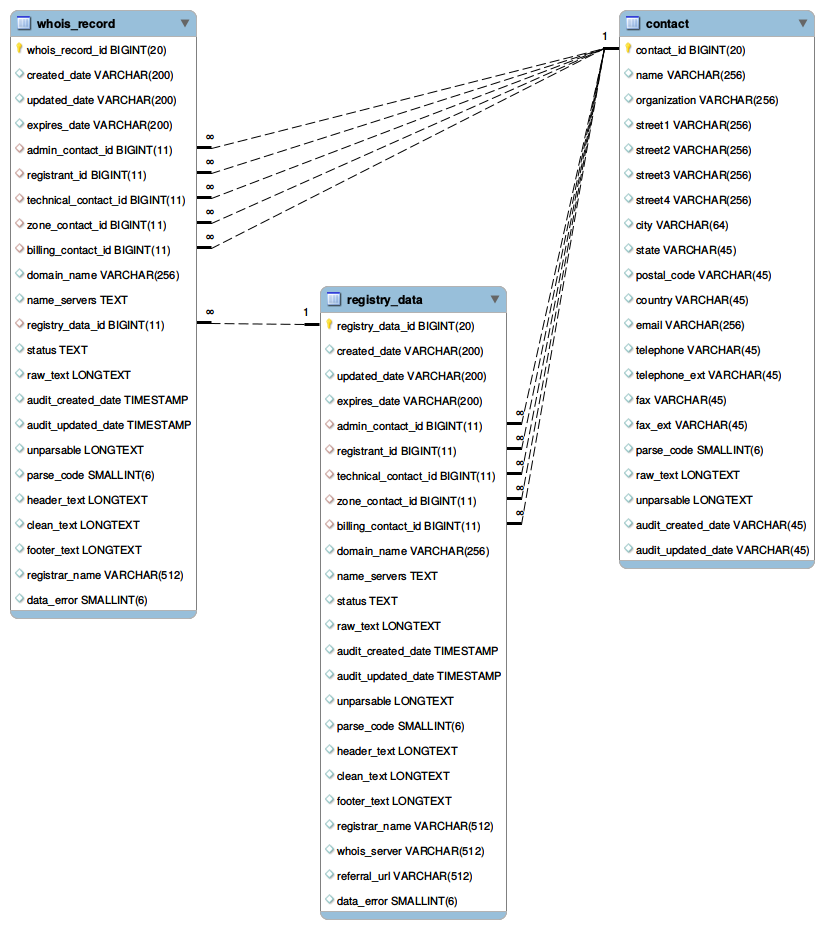
The detailed description of the tables is the following:
- Table: whois_record
- Fields:
- whois_record_id
- BIGINT(20) PRIMARY KEY NOT NULL Primary key of whois_record.
- created_date
- VARCHAR(200) When the domain name was first registered/created.
- updated_date
- VARCHAR(200) When the whois data was updated.
- expires_date
- VARCHAR(200) When the domain name will expire.
- admin_contact_id
- BIGINT(20) FOREIGN KEY Foreign key representing the id of the adminstrative contact for this whois_record. It references the primary key in contact table. The administrative contact is person in charge of the administrative dealings pertaining to the company of the domain name.
- registrant_id
- BIGINT(20) FOREIGN KEY Foreign key representing the id of the registrant for this whois_record. It references the primary key in contact table. The domain name registrant is the owner of the domain name. They are the ones who are responsible for keeping the entire WHOIS contact information up to date.
- technical_contact_id
- BIGINT(20) FOREIGN KEY Foreign key representing the id of the technical contact for this whois_record. It references the primary key in contact table. The technical contact is the person in charge of all technical questions regarding a particular domain name.
- zone_contact_id
- BIGINT(20) FOREIGN KEY Foreign key representing the id of the zone contact for this whois_record. is the person who tends to the technical aspects of maintaining the domain's name server and resolver software, and database files.
- billing_contact_id
- BIGINT(20) FOREIGN KEY Foreign key representing the id of the billing contact for this whois_record. It references the primary key in contact table. the billing contact is the individual who is authorized by the registrant to receive the invoice for domain name registration and domain name renewal fees.
- domain_name
- VARCHAR(256) FOREIGN KEY Domain Name
- name_servers
- TEXT Name servers or DNS servers for the domain name. The most important function of DNS servers is the translation (resolution) of human-memorable domain names and hostnames into the corresponding numeric Internet Protocol (IP) addresses.
- registry_data_id
- BIGINT(20) FOREIGN KEY Foreign key representing the id of the registry data. It references the primary key in registry_data table. Registry Data is typically a whois record from a domain name registry. Each domain name has potentially up to 2 whois record, one from the registry and one from the registrar. Whois_record(this table) represents the datafrom the registrar and registry_data represents whois data collected from the whois registry. Note that registryData and WhoisRecord has almost identical data structures. Certain gtlds(eg. most of.com and .net) have both types of whois data while most cctlds have only registryData. Hence it's recommended to look under both WhoisRecord and registryData when searching for a piece of information(eg. registrant, createdDate).
- status
- TEXT domain name status code; see details at https://www.icann.org/resources/pages/epp-status-codes-2014-06-16-en
- raw_text
- LONGTEXT the complete raw text of the whois record
- audit_created_date
- TIMESTAMP FOREIGN KEY the date this whois record is collected on whoisxmlapi.com, note this is different from WhoisRecord → createdDate or WhoisRecord → registryData → createdDate
- audit_updated_date
- TIMESTAMP FOREIGN KEY the date this whois record is updated on whoismlxapi.com, note this is different from WhoisRecord → updatedDate or WhoisRecord → registryData → updatedDate
- unparsable
- LONGTEXT the part of the raw text that is not parsable by our whois parser
- parse_code
- SMALLINT(6) a bitmask indicating which fields are parsed in this whois record. A binary value of 1 at index i represents a non empty value field at that index. The fields that this parse code bitmask represents are, from the least significant to most significant bit in this order: createdDate, expiresDate, referralURL(exists in registryData only), registrarName, status, updatedDate, whoisServer(exists in registryData only), nameServers, administrativeContact, billingContact, registrant, technicalContact, and zoneContact. For example, a parseCode of 3 (binary: 11) means that the only non-empty fields are createdDate and expiresDate. a parseCode of 8(binary:1000) means that the only non-empty field is registrarName. Note: the fields represented by the parseCode do not represent all fields exist in the whois record.
- header_text
- LONGTEXT the header of the whois record is part of the raw text up until the first identifiable field.
- clean_text
- LONGTEXT the stripped text of the whois record includes part of the raw excluding header and footer, this should only include identifiable fields.
- footer_text
- LONGTEXT the footer of the whois record is part of the raw after the last identifiable field.
- registrar_name
- VARCHAR(512) A domain name registrar is an organization or commercial entity that manages the reservation of Internet domain names.
- data_error
- SMALLINT(6) FOREIGN KEY an integer with the following meaning: 0=no data error 1=incomplete data; 2=missing whois data, it means that the domain name has no whois record in the registrar/registry 3=this domain name is a reserved word
- Table: registry_data
- Fields:
- registry_data_id
- BIGINT(20) PRIMARY KEY NOT NULL
- created_date
- VARCHAR(200)
- updated_date
- VARCHAR(200)
- expires_date
- VARCHAR(200)
- admin_contact_id
- BIGINT(20) FOREIGN KEY
- registrant_id
- BIGINT(20) FOREIGN KEY
- technical_contact_id
- BIGINT(20) FOREIGN KEY
- zone_contact_id
- BIGINT(20) FOREIGN KEY
- billing_contact_id
- BIGINT(20) FOREIGN KEY
- domain_name
- VARCHAR(256) FOREIGN KEY
- name_servers
- TEXT
- status
- TEXT
- raw_text
- LONGTEXT
- audit_created_date
- TIMESTAMP
- audit_updated_date
- TIMESTAMP FOREIGN KEY
- unparsable
- LONGTEXT
- parse_code
- SMALLINT(6)
- header_text
- LONGTEXT
- clean_text
- LONGTEXT
- footer_text
- LONGTEXT
- registrar_name
- VARCHAR(512)
- whois_server
- VARCHAR(512)
- referral_url
- VARCHAR(512)
- data_error
- SMALLINT(6) FOREIGN KEY
- Table: contact
- Fields:
- contact_id
- BIGINT(20) PRIMARY KEY NOT NULL
- name
- VARCHAR(512)
- organization
- VARCHAR(512)
- street1
- VARCHAR(256)
- street2
- VARCHAR(256)
- street3
- VARCHAR(256)
- street4
- VARCHAR(256)
- city
- VARCHAR(256)
- state
- VARCHAR(256)
- postal_code
- VARCHAR(45)
- country
- VARCHAR(45)
- VARCHAR(256)
- telephone
- VARCHAR(128)
- telephone_ext
- VARCHAR(128)
- fax
- VARCHAR(128)
- fax_ext
- VARCHAR(128)
- parse_code
- SMALLINT(6)
- raw_text
- LONGTEXT
- unparsable
- LONGTEXT
- audit_created_date
- VARCHAR(45)
- audit_updated_date
- VARCHAR(45) FOREIGN KEY
4.6. Further reading
There can be many approaches for creating and maintaining a MySQL domain WHOIS database depending on the goal. In some cases the task is cumbersome as we are dealing with big data. Our client-slide scripts are provied as samples to help our clients to set up a suitable solution; they can be used as they are in many cases. All of them come with a detailed documentation.
Some of our blogs can be also good reads with this respect, for instance, this one:
5. Incremental release updates
Here we describe in detail the contents of the subdirectory of csv/tlds_diff containing the updates of the release mentioned in Section 2.8. These are updates which are released if and only if it is not possible to provide complete and accurate information on the WHOIS system at the date of the release for technical reasons (e.g. some changes are unsettled in the WHOIS ecosystem).
Hence it is important to note that
- It is not necessary that each release has such incremental updates. Normally it is no need to release such updates.
- Incremental updates are not to be confused with daily updates which are provided in the daily feed. The term “incremental” in this case is used in order to emphasize that these updates can be applied without redownloading the quarterly database.
- You should use these updates if and only if you have downloaded a release and incremental updates have appeared since. As the whole release is updated along with the release of an incremental update, if you have just downloded a quarterly database, you never need to download incremental updates.
The data described here are provided under the feed name “whois_database_update”.
- Term definitions: thin and fat WHOIS records.
The notion of a thin WHOIS record and a fat WHOIS record only applies to the TLDs com and net. For each domain there are potentially up to two whois records. The thin WHOIS record comes from the registry (eg. Verisign), whereas a fat WHOIS record comes from the registrar (eg. GoDaddy, Network Solutions,etc).
The directory contents are:
- updated_tlds
- A text file containing a comma-separated list of TLDs for which updates are provided.
- simple
- A directory with simple csv files.
- regular
- A directory with regular csv files.
- full
- A directory with full csv files.
In each directory there are two kinds of data. Files named as
csvs.\$tld.\$csvtype.diff.tar.gz
(where $tld is the TLD, csvtype is “simple”, “regular” or “full”) contain thick WHOIS records in the respective csv format which are not there in the release. You should load this into your existing database to obtain the records which were unavailable when the release was issued.
Files named as
csvs.\$tld.\$csvtype.thin.tar.gz
(where $tld is the TLD, csvtype is “simple”, “regular” or “full”) contain thin WHOIS records in the respective csv format.
All these files are supplemented with their md5 and sha256 checksums.
6. Client-side scripts for downloading data, loading into databases, etc.
Scripts are provided in support of downloading WHOIS data through web-access and maintaining a WHOIS database. These are available on github:
The actual version can be downloaded as a zip package or obtained via git or svn.
There are scripts in Bourne Again Shell (BASH) as well as in Python (natively supported also on Windows systems).
The subdirectories of the repository have the following contents:
- whoisxmlapi_download_whois_data
- a Python2 script for downloading bulk data from daily and quarterly WHOIS data feeds in various formats. It can be used from command line, but also supports a simple GUI. For all platforms.
- whoisxmlapi_whoisdownload_bash
- a bash script for downloading bulk data from daily and quarterly WHOIS data feeds.
- whoisxmlapi_bash_csv_to_mysqldb
bash scripts to create and maintain WHOIS databases in MySQL based on csv files downloaded from WhoisXML API. If you do not insist on bash, check also
whoisxmlapi_flexible_csv_to_mysqldb
which is in Python 3 and provides extended functionality.
- whoisxmlapi_flexible_csv_to_mysqldb
- a flexible and portable script in Python to create and maintain WHOIS databases in MySQL based on csv files downloaded from WhoisXML API.
- whoisxmlapi_mysqldump_loaders
- Python2 and bash scripts to set up a WHOIS database in MySQL, using the data obtained from WhoisXML API quarterly data feeds.
- whoismxlapi_percona_loaders
- bash scripts for loading binary MySQL dumps of quarterly releases where available
- legacy_scripts
- miscellaneous legacy scripts not developed anymore, published for compatibility reasons.
In addition, the scripts can be used as a programming template for developing custom solutions. The script package includes a detailed documentation.
6.1. Data quality check
As WHOIS data come from very diverse sources with different policies and practices, their quality vary by nature. The data accuracy is strongly effected by data protection regulations, notably the GDPR of the European Union. Thus the question frequently arises: how to check the quality of a WHOIS record. In general, an assessment can be done in based on the following principles.
To decide if a record is acceptable at all, we recommend to check the following aspects:
- If the “createdDate”, “updatedDate”, or “expiresDate” fields are empty (and so are their version with their “standard” prefix), the record is invalid. These data are typically there even in the most GDPR-affected WHOIS records.
- If the "registrarName" field is empty, the record is invalid, except for some TLDs (typically ccTLDs) where the WHOIS server does not provide registrar information.
If these criteria are met, the record can be considered as valid in principle. Yet its quality is still in a broad range. To further assess the quality, the typical approaches
- The number of non-empty fields (the larger the better).
- The number of redacted fields. A field containing the word "redacted" with various capitalizations (e.g. also “Redacted” or “REDACTED”). The smaller the number of such fields, the better is the record.
- Check some fields relevant in the particular application. E.g. “registrant_name”, certain e-mail addresses are non-empty or can be validated (e.g. valid e-mail).
In what follows we describe how to check these aspects in case of the different download formats.
6.2. Quality check: csv files
In case of csv files the file has to be read and parsed. Then the empty or redacted fields can be identified, while the non-empty fields can possibly be validated against the respective criteria.
6.3. MySQL dumps
The WHOIS databases recovered from MySQL dumps contain a field named “parseCode”, which makes the quality check more efficient. (It is not present in the csv files.) It is a bit mask indicating which fields have been parsed in the record; a binary value of 1 at position i points to a non-empty value field at that position.
The fields from the least significant bit to the most significant one are following: "createdDate", "expiresDate", "referralURL" (exists in "registryData" only), "registrarName", "status", "updatedDate", "whoisServer" (exists in "registryData" only), "nameServers", "administrativeContact", "billingContact", "registrant", "technicalContact", and "zoneContact". For example, a parse code 310=(11_{2}) means that the only non-empty fields are "createdDate" and "expiresDate", whereas the parse code 810=(1000_{2}) means that the only non-empty field is "registrarName".
If you need to ascertain that a WHOIS record contains ownership information, calculate the binary AND of the parse code and 0010000000000_{2}=512_{10} it should be 512. (The mask stands for the non-empty field “registrant”).
7. FTP access to quarterly gTLD WHOIS data
WHOIS data can be downloaded from our ftp servers, too. In case of newer subscribers the ftp access is described on the web page of the subscription.
7.1. FTP clients
You can use any software which supports the standard ftp protocol. On most systems there is a command-line ftp client. As a GUI client we recommend FileZilla (https://filezilla-project.org, which is a free, cross-platform solution. Thus it is available for most common OS environments, including Windows, Mac OS X, Linux and BSD variants.
7.2. FTP directory structure
Quarterly WHOIS data are provided via the ftp server
ftp.domainwhoisdatabase.com
The quarterly releases that are available to you within your
subscription plan will be under the directory quarterly_gtld and
quarterly_cctld, respectively, in a subdirectory named after the
release version.
7.3. FTP firewall settings
In order to use our ftp service to download quarterly WHOIS data, you need to ensure that the following ports 21, 2121, and 2200 are open on both TCP and UDP on your firewall for ftp.domainwhoisdatabase.com.
If the respective ports are not open, you will encounter either of the following behaviors: You cannot access the respective server. You can access the respective server, but after login, you can't even get the directory listing, it runs onto timeout. If you encounter any of these problems, please revise your firewall settings.
End of manual.